
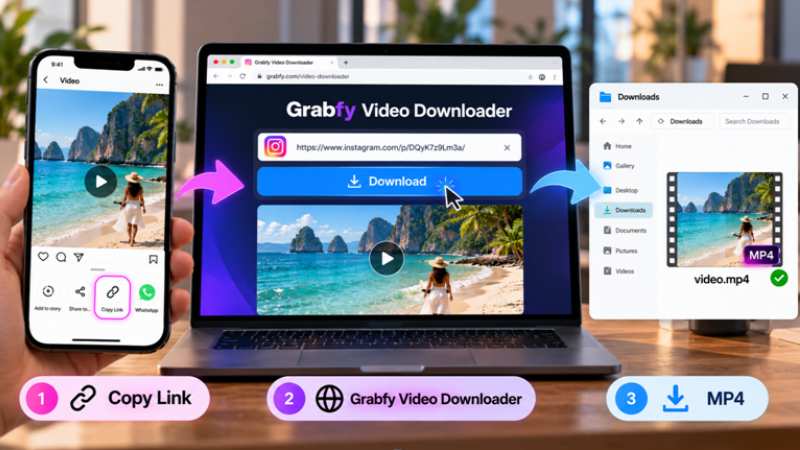
To download an Instagram video, copy the link to a public post, paste it into a browser-based downloader such as Grabfy, and save the available file to your device. This method works across Android, iPhone, and desktop browsers without installing additional software.
Instagram contains useful tutorials, creative Reels, memorable Stories, and photo collections. However, its built-in download options vary depending on content format, creator settings, and platform restrictions.
Grabfy offers a practical way to save supported public Instagram videos, Reels, Stories, photos, and carousel posts. This guide explains the downloading process, device-specific instructions, video quality, common problems, and responsible content use.
How to Download Instagram Videos With Grabfy
Downloading an Instagram video generally involves copying its link, opening a compatible downloader, and saving the available file.
Step 1: Copy the Instagram Video Link
Open Instagram through its mobile application or visit Instagram.com in your browser.
Find the public video or Reel you want to save. Tap Share and select Copy Link. Depending on Instagram’s interface, this option may also appear in the three-dot menu.
On a computer, you can copy the video’s URL directly from the browser’s address bar.
Make sure you copy the link to the specific post rather than the creator’s profile.
Step 2: Open Grabfy Video Downloader
For a convenient browser-based solution, use Grabfy Video Downloader to process supported public Instagram video links.
Grabfy is particularly useful when you want to download videos without installing additional applications or entering Instagram account credentials.
Its straightforward link-based workflow makes it suitable for occasional downloads, creative references, and authorized content archiving.
Paste the copied Instagram URL into the designated input field and select the download option.
Step 3: Save the Available Video
Once the link is processed, follow the instructions to save the available file.
Instagram videos are commonly downloaded as MP4 files, which are compatible with most smartphones and computers.
The available resolution depends on the source media and what Instagram makes accessible.
If the file does not appear immediately, check your browser’s Downloads folder or download history.
Why Use a Browser-Based Instagram Downloader?
Browser-based downloaders offer a convenient alternative when Instagram does not provide a direct download option.
No Additional Software Required
Instead of installing a separate application, you can open the downloader in your existing browser.
This is useful for people switching between smartphones and computers because the downloading process remains largely consistent.
Download Available Video Quality
Instagram processes and compresses uploaded videos, which can affect resolution and visual quality.
A downloader may retrieve an available HD version, but it cannot guarantee access to the creator’s untouched original recording.
If multiple resolutions are available, choose the version that suits your storage capacity and viewing needs.
Access Without Instagram Credentials
Public-link downloaders generally do not require Instagram usernames or passwords.
Avoid websites requesting login credentials, suspicious browser extensions, or unrelated software installations, and be cautious with third-party websites that may be cluttered with ads and security risks.
Using a browser-based service does not eliminate every privacy risk, so review the website’s security practices to ensure they respect user privacy and work with only public posts. Any tool should limit processing to content from a public Instagram account to protect user privacy.
What Instagram Content Can You Download?
Instagram supports several media formats, each with different accessibility requirements.
Instagram Reels and Feed Videos
Reels include entertainment clips, educational tutorials, product demonstrations, and behind-the-scenes footage.
Instagram offers built-in downloads for certain public Reels when creators allow them.
For other supported public videos, an Instagram video downloader or Instagram Reels downloader provides another option for saving accessible media. Some tools save ig videos as clean HD MP4 files and may support Reels downloads in original 1080p quality when available, making Instagram downloads more practical.
Instagram Stories and Highlights
Instagram Stories usually remain visible for 24 hours unless creators preserve them as Highlights.
Some tools let users download stories from public instagram stories without signing in, as FastDl.app supports downloading Instagram Stories without an account. Certain services, including VideoDropper, allow anonymous story saving in original quality without watermarks, but SaveFromInsta lets you access Stories from public accounts only.
Expired Stories that were not preserved or otherwise made available generally cannot be recovered through public downloaders.
Private Stories and Close Friends content remain restricted.
Instagram Photos and Carousel Posts
Carousel posts contain multiple photos, videos, or both within one publication.
Compatible downloaders may support individual images or multiple carousel items, and an Instagram photo downloader may help save single images from Instagram posts or several carousel frames at once.
Some tools save public photos in high resolution, including full-resolution files pulled from Instagram’s servers, and may keep them watermark-free.
These features can be useful for archiving your own posts, organizing approved campaign assets, or collecting authorized visual references.
How to Download Instagram Reels for Offline Viewing
Reels are useful to save when you want to revisit tutorials, examine editing techniques, or preserve authorized content.
First, check whether Instagram offers a Download option through the Reel’s sharing menu.
If that option is unavailable, a compatible browser-based downloader may help with publicly accessible content.
Saving Reels Through Grabfy
For users working with multiple Instagram media formats, Grabfy provides browser-based tools for supported Reels, videos, photos, Stories, and carousels.
This makes it a convenient starting point when organizing public Instagram content without installing separate downloading applications.
Copy the public Reel’s URL, open the appropriate Grabfy tool, paste the link, and follow the available download instructions.
Audio availability may vary because of licensing restrictions and source-file limitations.
Organizing Downloaded Reels
Create separate folders for educational videos, creative references, travel clips, and personal content.
Use descriptive filenames and record the original post URL when maintaining professional content archives.
Download Instagram Videos on iPhone and Android.
Both operating systems support browser-based downloads, although saved files may appear in different locations.
Downloading Instagram Videos on iPhone
Open Instagram and copy the public video’s link.
Launch Safari or Chrome, open your downloader, and paste the URL.
After downloading, check the Files app, particularly the Downloads folder.
To move a compatible video into Photos, open the file and use the available Save Video option.
Downloading Instagram Videos on Android
Open Instagram, copy the public post URL, and paste it into a compatible downloader using Chrome or another browser.
After saving the file, open your device’s file manager and check Downloads.
The video may also appear in Gallery or Google Photos after indexing.
Download Instagram Videos on Windows, Mac, and Linux
Desktop downloading follows the same basic process.
Open Instagram in Chrome, Firefox, Safari, Edge, or another compatible browser.
Copy the public video’s URL, paste it into the downloader, and save the available file.
Most browsers store downloads in a designated folder unless you have changed the settings.
Desktop computers are particularly convenient for organizing authorized campaign references and larger video collections.
Is Downloading Instagram Videos Legal?
Downloading publicly accessible content does not automatically grant permission to reuse it.
Instagram videos, photographs, and other creative works may be protected by copyright.
Personal Viewing and Offline Storage
Saving content for personal reference differs from distributing it publicly.
However, personal use is not automatically exempt from copyright restrictions in every jurisdiction.
Consider Instagram’s terms and the rights associated with the material.
Reposting and Commercial Use
Before reposting someone else’s video, using a Reel in advertising, or publishing downloaded photographs commercially, obtain appropriate permission.
Giving credit does not automatically replace authorization.
Respecting Private Accounts
Public downloaders cannot legitimately bypass private-account restrictions.
If content is restricted or unavailable, respect the creator’s privacy settings.
Tips for Smooth Instagram Video Downloads
Check the Instagram URL
Confirm that you copied the complete link to the intended public post.
Deleted, private, or unavailable content may prevent successful downloading.
Refresh and Try Again
If processing fails, refresh the downloader page and paste the link again.
Repeated failures may indicate unsupported or inaccessible media rather than a temporary error.
Use a Stable Internet Connection
Large video files require more data than photographs.
A stable connection helps prevent interrupted downloads, particularly for longer videos.
Keep Your Browser Updated
Updated browsers improve compatibility and address security issues.
Avoid unfamiliar extensions or unnecessary permissions when downloading Instagram content.
Frequently Asked Questions About Instagram Downloaders
Is Grabfy Free to Use?
Grabfy offers browser-based downloading for supported public Instagram content without requiring a separate application. Check its website for current features and limitations.
Do I Need an Instagram Account?
Not necessarily. Supported public links can be processed without signing into Instagram.
Can I Download Instagram Videos in HD?
HD downloads depend on the available source resolution. Downloaders cannot restore details lost during compression.
Will Instagram Notify Someone When I Download Their Video?
Instagram generally does not notify creators when someone downloads an ordinary public Reel or post. Different rules may apply to disappearing media in messages.
Why Won’t My Instagram Video Download?
Common causes include invalid URLs, restricted posts, unsupported media, and connection problems.
Final Thoughts
Downloading Instagram videos can be straightforward when the content is publicly accessible, and the downloader supports its format.
Grabfy provides a convenient browser-based option for saving supported videos, Reels, Stories, and photos across Android, iPhone, and desktop devices. Always check video quality, organize downloaded files carefully, and respect the original creator’s rights.